

Nokia 105 4G
About this phone
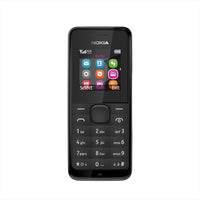
The Nokia 105 4G is the classic brick phone for calls and texts. It has no camera, a battery that lasts for days, a torch, and a tough body rated against dust and splashes.
It is a 4G phone, so it does not depend on the older 2G network. Put a Wowtel SIM in it and only the people you approve can call or text your child.
- 4G calls and texts
- No camera
- Up to 12 days on standby, says Nokia
- Nano SIM
- USB-C charging (cable included, mains plug not included)
- Unlocked, and works with your Wowtel SIM
Need a Wowtel plan too?
Choose your plan first. You can add this phone to it on the plan's page, and the SIM and phone arrive together.
At a glance
The Nokia 105 4G in plain terms.
The best-known brick phone there is. No camera, a battery that lasts for days and a tough, splash-resistant body. It is a 4G phone, so it does not depend on the older 2G network.
No
Camera
4G
Network
12 days
Standby battery, says Nokia
Nano
SIM size
The details
- Network
- 4G, with 2G as a back-up
- Camera
- None
- Internet
- A basic web browser, which only works if the SIM has mobile data. No Wi-Fi
- Screen
- 1.8 inch colour
- Size and weight
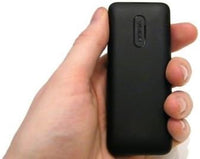
- 121.5 x 50 x 14.4 mm, 93 g
- Battery
- 1450 mAh, removable. Nokia quotes up to 12 days on standby or 8 hours of talk
- SIM
- Nano SIM, fitted under the battery
- Charging
- USB-C. Cable included, mains plug not included
- Toughness
- Rated IP54 against dust and splashes
- Also has
- Torch, FM radio, Bluetooth, headphone socket, microSD slot, Snake
- In the box
- Phone with battery, USB-C cable, guides
Good to know
It has a web browser. The browser can only go online if the SIM has mobile data. Wowtel Start has no data at all, so on Start it has nothing to connect to. On Plus, leave the data add-on off for the same result.
No mains plug in the box. It comes with a USB-C cable. Use any USB plug you have at home.
It has a few extras. Snake, an FM radio and Bluetooth.
How to use it
Setting up the Nokia 105 4G.
Eight things to know, taken from Nokia's own user guide.
-
Fit the SIM and battery
Put a fingernail in the small slot at the bottom of the phone and lift off the back cover. Take the battery out. Slide the nano SIM into the SIM slot, then put the battery and the cover back.
-
Charge it and switch it on
Plug the cable into the phone and into a USB plug. To switch the phone on, press and hold the red end-call key.
-
Make and answer a call
Type the number and press the green call key. Press the red key to end. To answer, press the green key.
-
Send a text
Go to Menu, Messages, Create message. Write the text and choose Options, Send. Then type the number, or choose Search to pick a contact.
-
Save a contact
Go to Menu, Contacts, Options, New. Enter the name and number, and save.
-
Lock the keys
Choose Go to, the bottom-left key, then Lock keypad. To unlock, press the red end-call key and choose Unlock.
-
Silent mode
Go to Menu, Settings, Profiles and select the silent profile.
-
Set a security code
Go to Menu, Settings, Security, Keyguard, Security code. Write the code down. Nokia cannot unlock the phone if it is forgotten.
Steps are from the maker's own instructions. Menus can differ slightly between versions of the phone.
Wowtel on this phone
How Wowtel works on the Nokia 105 4G.
Wowtel's rules are set in the mobile network, not on the phone. So there is nothing to install, and nothing on the handset for your child to switch off.
-
Approved contacts
There is nothing to set on the phone. You choose who can call and text from your Wowtel account, in your own web browser.
A call from someone you have approved rings as normal. A call from anyone else is stopped in the network, so the phone never rings.
-
Save the same names on the phone
The Nokia 105 shows a name only for numbers saved in its own contacts. Save Mum, Dad and the rest there too, so your child sees who is calling.
-
Home always gets through
The home numbers you set always reach your child, including during quiet hours.
Save them first in the phone's contacts, so they are easy to find.
-
On Plus
Quiet hours for school and bedtime
Set the hours in your account. During them, calls don't ring on the phone, apart from your home numbers. There is nothing to switch on or off on the handset.
-
999
No setting you choose can block 999 or 112. On this phone, type 999 and press the green call key.
-
The browser and mobile data
Start has no mobile data, so the phone's browser cannot connect to anything. On Plus, leave the data add-on off and the result is the same. Premium-rate numbers won't connect on either plan.
Quiet hours are on the Plus plan. Everything else here is on every plan.
Questions
Questions about the Nokia 105 4G.
-
Does the Nokia 105 4G have a camera?
No. It has no camera, front or back.
-
Can my child go online on it?
Only if the SIM has mobile data. The phone has a basic web browser, but Wowtel Start has no data, so the browser cannot connect. The phone has no Wi-Fi.
-
Which SIM size does it take?
A nano SIM, the smallest size. It goes under the battery.
-
Does it come with a charger?
It comes with a USB-C cable but no mains plug. Any USB plug will charge it.
-
Will it still work when 2G is switched off?
UK networks plan to start switching 2G off from 2029. This is a 4G phone, so it does not depend on 2G.
-
Will my child's school allow it?
It has no camera, and it is on many schools' lists of allowed phones. It does have a browser, so check your own school's list. On Wowtel Start the browser has no data to use.
Add a Wowtel plan
The handset is only the phone. Pair it with a plan for safe calls, texts and the parent controls.
- ✓Unlimited calls & texts with approved contacts
- ✓Unknown callers blocked, home numbers always through
- ✓No mobile data, so it meets schools' no-data rule
- ✓Quiet hours for school and bedtime
- ✓Unknown callers passed first to a parent you nominate
- ✓Optional call flagging and optional mobile data
- ✓Safeguarding alerts by SMS as well as email
- ✓Voice-to-text messages
- ✓Option to record calls your child makes
Built for the new school phone rules.
Many schools now ask for a basic phone with a no-data SIM. See how Wowtel meets the rules, and what to check on your own school's list.